
How do I track my profit margins?
Click SALES and you can access profit margins for each vehicle: purchase price, selling price, gross margin amount, net margin, and margin percentage. This information is also available in exported reports.
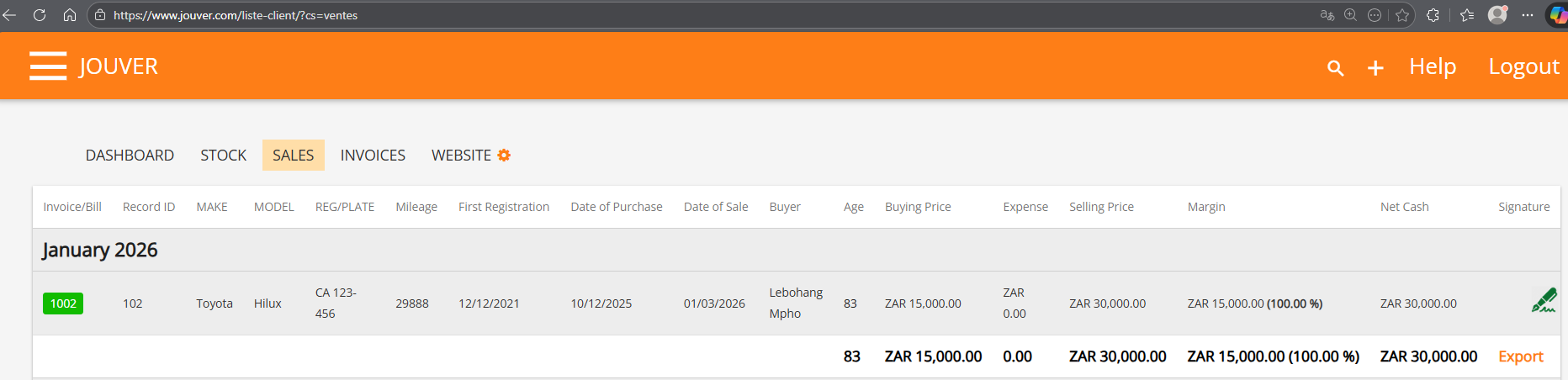
Details: Margin tracking is essential for understanding profitability at both individual deal and overall business levels.
For every completed sale, Jouver calculates and displays comprehensive margin information. The gross margin shows your profit before deducting any expenses: selling price minus purchase price equals gross profit.
The margin percentage expresses this as a percentage of the selling price, making it easy to compare profitability across vehicles of different price ranges.
Net margin accounts for additional costs you've incurred, such as reconditioning, repairs, registration fees, or other expenses you've recorded in the system.
This gives you a true picture of actual profitability after all costs. You can view margins for individual vehicles or look at totals across time periods to understand overall performance.
The margin data is included when you export sales reports, allowing you to analyze profitability trends, identify which vehicle types or price ranges generate the best margins, and make data-driven decisions about what to stock.
Many dealers discover through margin analysis that their highest-volume vehicles aren't necessarily their most profitable ones, leading to strategic shifts in purchasing.
Regular margin review helps you optimize your business model for maximum profitability rather than just maximum volume.