
What does the Sales page show?
The Sales page provides month-by-month sales breakdowns showing invoice numbers, vehicles sold, customers, days in stock, purchase vs selling prices, and profit margins.
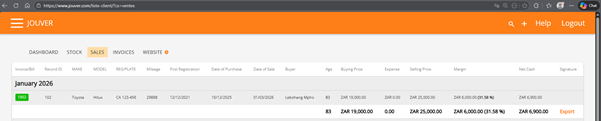
Details: The Sales page is your performance analytics hub. It organizes all completed sales by month, making it easy to track trends and seasonality. For each sale, you can see the invoice and order numbers, which vehicle was sold, who bought it, and exactly how long it sat in your inventory before selling. The page calculates and displays both the purchase price and selling price, along with your realized profit margin in both dollar amount and percentage. You can view gross margins (before expenses) and net margins (after expenses) per vehicle. The current month summary gives you real-time visibility into your monthly performance. All this data can be exported to Excel or CSV format for deeper analysis, accounting purposes, or tax preparation, making it simple to share with your accountant or financial advisor.