
What information does the Stock page show?
The Stock page is your inventory command center with key vehicle data and two viewing modes depending on your needs:
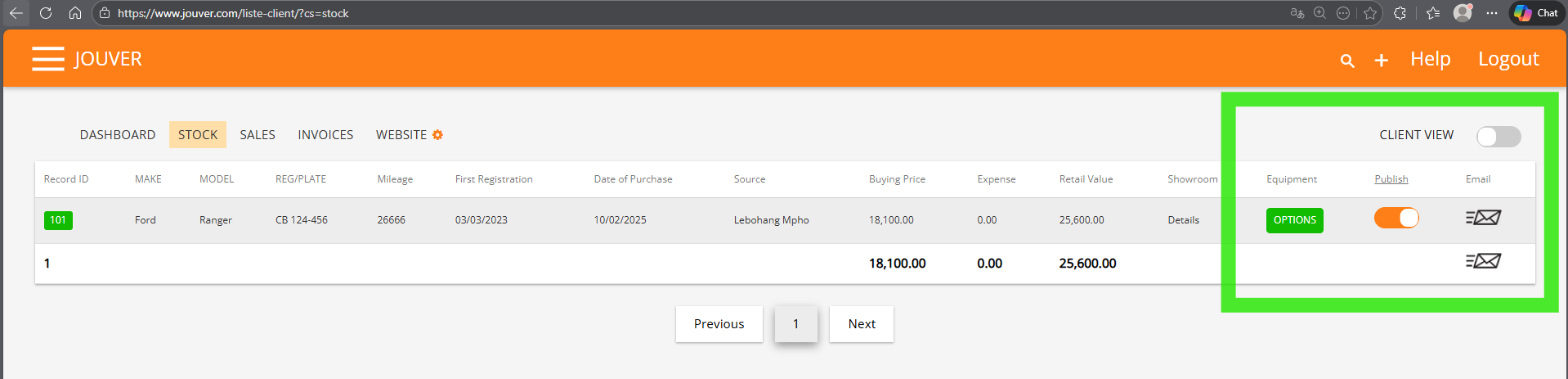
- DEALER VIEW (Full Information): You see complete business information for each vehicle including buying price, expenses, purchase date, source, and all financial metrics.
- CLIENT VIEW (Customer-Safe Display): Toggle CLIENT VIEW ON (orange toggle in top right corner) to hide sensitive business information when showing customers your inventory.
- CRITICAL FINANCIAL SUMMARY (Bottom Totals): The bottom summary row provides three essential financial metrics that give you instant visibility into your inventory investment and potential.
- MANAGING VEHICLE EQUIPMENT (OPTIONS Button): Add comprehensive vehicle features and trim options to enhance your listings.
DEALER VIEW (Full Information):
You see complete business information for each vehicle:
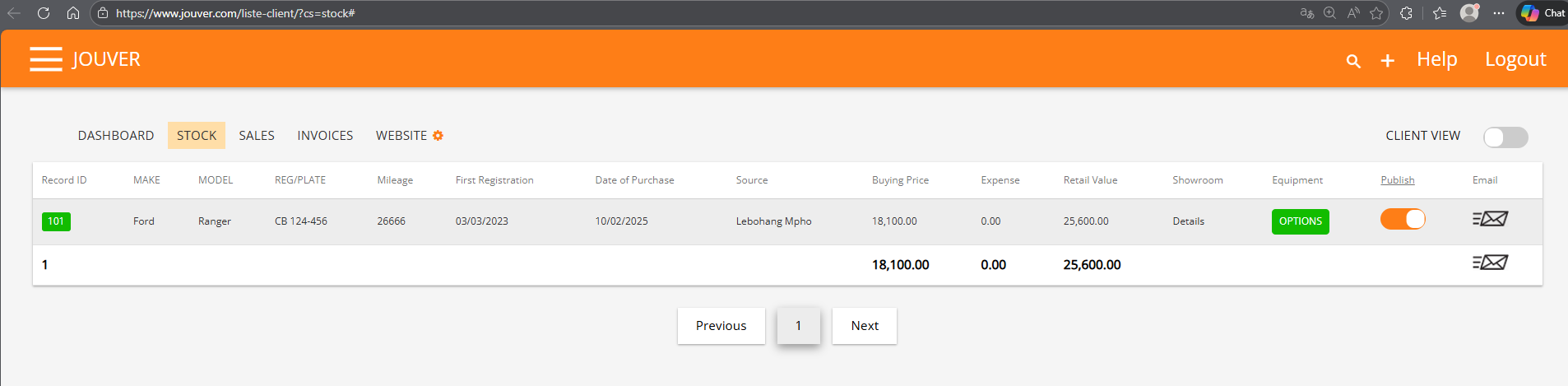
- Record ID: Official Inventory Record ID (e.g., "101") for compliance tracking
- Make & Model: Vehicle identification (e.g. Ford Ranger)
- Registration Plate: License plate number (e.g. CB 124-456)
- Mileage: Current odometer reading (e.g. 26666 km)
- First Registration: Original registration date (e.g. 03/03/2023)
- Date of Purchase: When you acquired the vehicle (e.g. 10/02/2025)
- Source: Where it came from (e.g. seller name, auction name, dealer name)
- Buying Price: What you paid for each vehicle (e.g. 18,100)
- Expenses: Additional costs like repairs or reconditioning (e.g. 0.00)
- Retail Value: Your asking price for each vehicle (e.g. 25,600)
- Showroom: Setting button regarding your vehicle advertising to be shown in your Digital Showroom
- Equipment: Vehcile features and options
- Publish: Toggle to publish your vehicle on your Digital Showroom
- Options: Button to add and manage vehicle equipment and trim options
- Email: the vehicle info-pack (Brand, model, price... and photos) to the potentail buyers
CLIENT VIEW (Customer-Safe Display):
Toggle CLIENT VIEW ON (orange toggle in top right corner) to hide sensitive business information when showing customers your inventory.
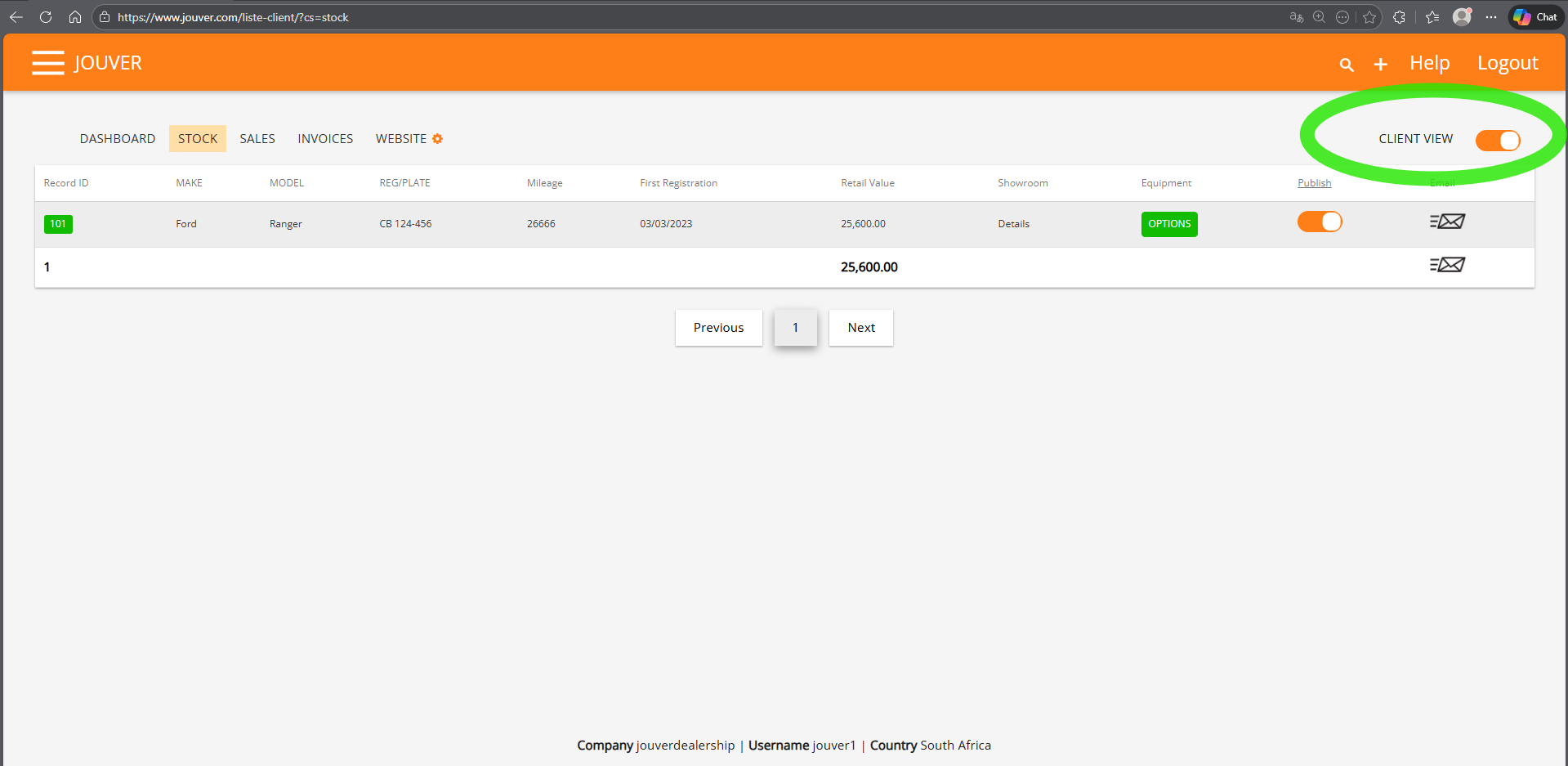
What CLIENT VIEW Hides:
- Date of Purchase (how long it's been sitting)
- Source (where you got it)
- Buying Price (what you paid)
- Expenses (your reconditioning costs)
- Days in inventory calculations
- Bottom financial totals (your investment and margins are completely hidden)
What Customers Still See: Customers see all relevant vehicle information including make, model, mileage, registration date, retail value, and equipment without seeing your margins, holding times, or acquisition costs.
Why CLIENT VIEW Matters:
- Protect Your Margins: Customers don't see what you paid versus what you're asking
- Hide Holding Times: They can't see how long vehicles have sat unsold (which could trigger aggressive negotiation)
- Hide Financial Totals: Your total investment and potential profits remain confidential
- Professional Presentation: Show inventory confidently without worrying about sensitive data exposure
- Flexible Use: Toggle on/off instantly depending on whether you're working alone or with a customer present
How to Use CLIENT VIEW: Simply click the CLIENT VIEW toggle in the top right corner to switch between modes. The orange color indicates CLIENT VIEW is active and your business data is hidden. Toggle off to return to full dealer view with complete financial transparency. This lets you professionally show your stock on screen during showroom visits, walk customers through inventory on your computer, or display your listings without revealing confidential business data.
CRITICAL FINANCIAL SUMMARY (Bottom Totals):
The bottom summary row provides three essential financial metrics that give you instant visibility into your inventory investment and potential:
1. Total Buying Price (e.g., 18,100): This is the total cash you've invested in purchasing all vehicles currently in your stock. This number represents how much capital you have tied up in inventory. Monitoring this helps you understand your cash flow and whether you have capacity to acquire more inventory or need to focus on selling existing stock to free up capital.
2. Total Expenses (e.g., 0.00): This is the total amount spent on reconditioning, repairs, detailing, parts, and other costs to prepare all vehicles for sale. Combined with buying price, this shows your true total investment in current inventory. If this number grows too large relative to buying prices, it may indicate you're purchasing vehicles requiring excessive reconditioning.
3. Total Retail Value (e.g., 25,600): This is the total asking price for all vehicles if you sold everything at your listed retail prices. This represents your potential revenue if you sold your entire inventory at full asking price. The difference between total retail value and (buying price + expenses) shows your potential gross profit margin across your entire stock.
What These Totals Tell You:
- Capital Invested: Total buying price + total expenses = your complete inventory investment
- Potential Profit: Total retail value - (total buying price + total expenses) = potential gross profit
- Margin Percentage: (Potential profit ÷ total retail value) × 100 = overall margin percentage
- Inventory Health: Track how these numbers change over time to monitor business performance
MANAGING VEHICLE EQUIPMENT (OPTIONS Button):
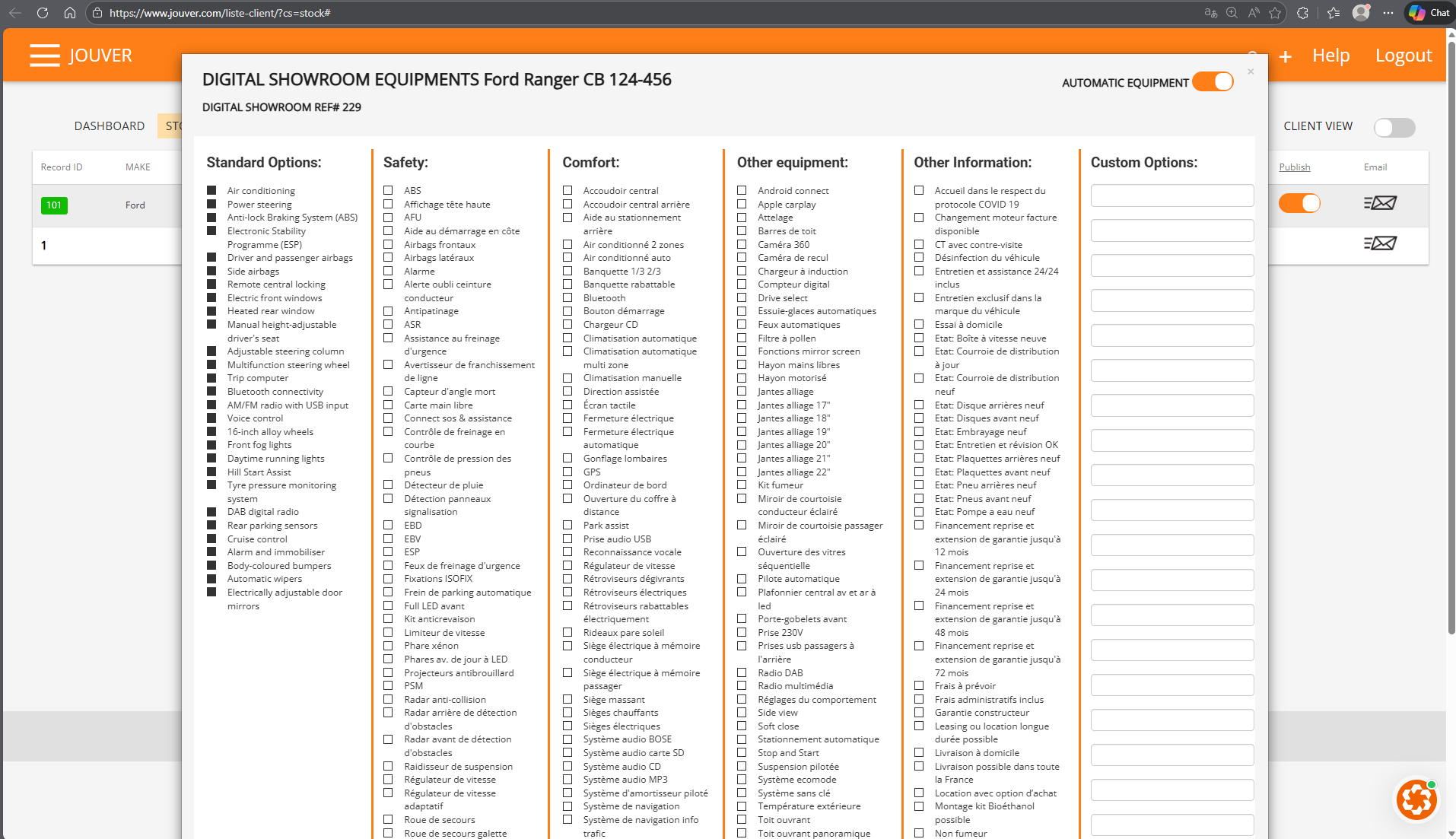
Click the OPTIONS button for any vehicle to open the Digital Showroom Equipments screen where you can specify every feature and option installed on that vehicle.
AUTOMATIC EQUIPMENT Toggle: Located in the top right of the equipment screen, this toggle (when ON, shown in orange) enables automatic AI equipment detection. When activated, Jouver can auto-populate standard equipment based on the vehicle's make, model, and trim level, saving you significant time on data entry.
The equipment manager is organized into six categories:
1. Standard Options: Core features like air conditioning, power steering, ABS, electronic stability program, airbags, side airbags, central locking, electric front windows, heated rear window, manual height-adjustable driver's seat, adjustable steering column, multifunction steering wheel, trip computer, Bluetooth connectivity, AM/FM radio with USB input, voice control, 16-inch alloy wheels, front fog lights, daytime running lights, hill start assist, tire pressure monitoring system, DAB digital radio, rear parking sensors, cruise control, speed limiter, body-colored bumpers, automatic wipers, and electrically adjustable door mirrors. Check all items that come standard with this vehicle.
2. Safety: Safety features including ABS, high-mounted brake light, AFU, hill start assist on coast, front airbags, side airbags, alarm, driver belt reminder, anti-skid system, emergency braking assistance, lane departure warning, brake assist, free-wheeling warning, driver angle monitoring, free hand card, hands-free and assistance connection, EBD, EBV, ESC, emergency brake lights, ISOFIX attachments, automatic parking brake, full LED front lights, anti-theft kit, speed limiter, xenon headlights, LED daytime running lights, anti-collision projectors, PSM, radar anti-collision, rear obstacle detection radar, front obstacle detection radar, adaptive suspension, speed regulator, adaptive speed regulator, and emergency wheel.
3. Comfort: Comfort features such as central armrest, rear central armrest, parking assistance, 2-zone air conditioning, automatic air conditioning, heated seats 1/3 2/3, foldable rear seat, Bluetooth, electric sunroof, CD player, automatic climate control, automatic climate, assisted steering, electric seat, closing automatic, towing preparation, electric parking brake, electrically adjustable heated mirrors, GPS, USB socket, MP3 audio system, SD card audio system, CD audio system, MP3 audio system, pilot damping system, info traffic navigation system, electric massage seats, heated front seats, electric memory seats, sunshades, BOSE audio system, and various other convenience features.
4. Other Equipment: Additional features like Android Auto, Apple CarPlay, Bluetooth, roof bars, camera 360, reversing camera, induction charger, digital screen, drive select, automatic ice scrapers, automatic lights, heated mirror, hand-free rearview mirror, mirror motorized, alloy wheels in sizes 17", 18", 19", 20", 21", 22", tow hitch, rain sensor, automatic wiper, sequential opening windows, automatic pilot, central platform rear and front LED lighting, sunroof, digital temperature exterior, automatic trunk opener, opening sunroof, and panoramic sunroof.
5. Other Information: Important vehicle details including COVID-19 protocol compliance, engine replacement availability if needed, warranty against hidden defects, vehicle disinfection, 24/7 maintenance and assistance included, exclusive brand maintenance, home test drive, new speed belt, new distribution belt, new rear belt, new front belt, new embrayage belt, maintenance and revision completed, fuel pump replaced, administrative fees included, construction warranty, leasing or long-term rental options, home delivery, delivery possible throughout France, purchase with option to buy, assembly at Biofethane possible, and non-smoker vehicle.
6. Custom Options: Free-text field where you can add any unique or uncommon features not listed in the standard categories.
Digital Showroom Reference Number: Each equipment configuration is assigned a reference number (e.g., "REF# 229") for tracking and internal reference.
After selecting all applicable equipment options, the information automatically appears in the Equipment column on your Stock page and is included in all vehicle listings, commercial sheets, and your digital showroom. Detailed equipment lists help customers understand exactly what features are included and improve the perceived value of your vehicles, leading to faster sales and better prices.
You can also read our artcile about adding trims and options for a vehicle here.